
Can't log in? Start here
There are two separate passwords behind City Lifestyle, and knowing which one you're stuck on is most of the fix.
- Your ARC password — used to sign in to ARC. This one is its own password, separate from your email.
- Your City Lifestyle email password — your Google account, used for Gmail, Drive, and Calendar.
If you can't get into ARC
ARC has its own reset flow and you can complete it yourself — you don't need to wait on support.
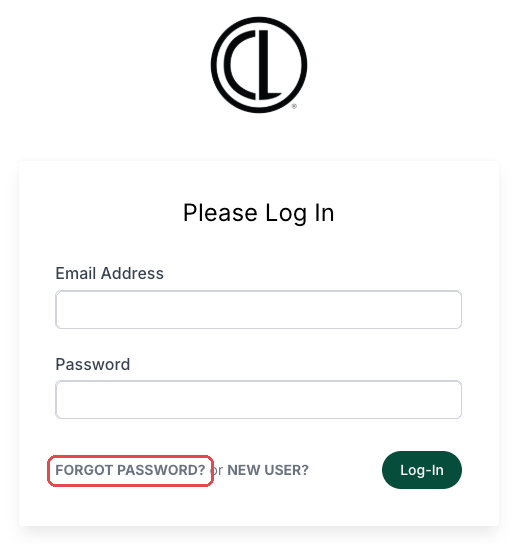
- Go to the ARC sign-in page:
https://citylifestylehq.com/login/ - Click Forgot password? under the password box.
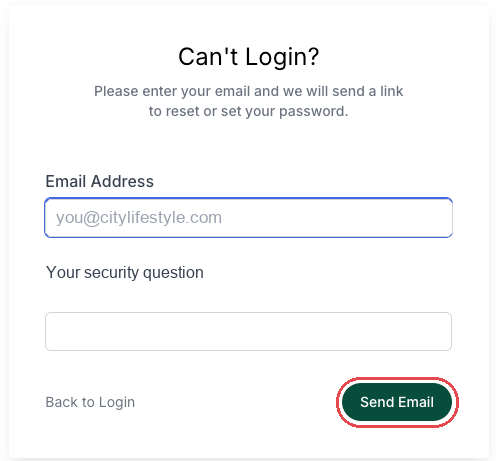
- Enter your City Lifestyle email address.
- Answer your security question.
- Click Send Email, then check your email for the reset link and follow it to set a new password.
If the reset doesn't get you back in, write to support and let us know you already tried it.
If you can't get into your City Lifestyle email
Start with Google's own recovery on the sign-in screen. Whether you can finish it yourself depends on how your account is set up — if you have a recovery phone or personal email on file, Google will usually walk you through it.
Two cases where you'll need us instead:
- You see a message telling you to contact your administrator. That means Google has handed the reset to us rather than letting you self-serve. Email support and we'll take it from there.
- You're fully locked out and Google's recovery options don't work for you.
Neither of those means something is wrong with your account. It's just which path Google decided to send you down.
If ARC works but your calendar or email features don't
ARC also connects to your Google account to handle calendar and email — things like your booking page and meeting scheduling. That connection is separate from either password, and it can break on its own.
Signs it's the connection rather than a password:
- You can sign in to ARC fine, but your booking page shows no available times
- Your calendar isn't syncing with ARC
- Email features in ARC aren't working, but Gmail itself is fine
Write to support for these — there's no self-serve fix, and a password reset won't help.
What to include when you contact us
- Your City Lifestyle email address
- Which one you're stuck on — ARC, your email, or a calendar/booking problem
- Whether you already tried the reset flow, and what happened
- A screenshot of what you're seeing
- Anything that changed recently — new phone, new computer, or travel
If you're writing in for someone on your team, include their City Lifestyle email address too.
If we reset your email password for you
You'll get an email from Google, not from us, with the subject "Your Google Account password for citylifestyle.com has been reset by your administrator."
- It contains a Reset password button, not a password — you'll click it and choose your own
- The link expires after 48 hours, so use it when you have a few minutes
- It goes to your personal email address on file, since you can't get into your CL email yet
- Check your Promotions and Updates tabs. Google's message often sorts there instead of your main inbox — this is the most common reason people think it never arrived
- If you use 2-Step Verification, have your phone nearby — you'll be asked for a code right after setting the new password
Still stuck? Reply to your ticket and we'll take another look.